CryptoSys Home >
FirmaSAT >
FirmaSAT Validation REST API

The FirmaSAT Validation REST API provides a REST (REpresentational State Transfer) interface to the FirmaSAT On-line Validator.
Inroduction | Summary | Endpoint URL and Method | Getting an API token | Request Body | Response Format | Status results | Encoding XML data into JSON | Example | Suggested API client code | Test files | Using curl | YAML documentation | Disclaimer | Contact us
The FirmaSAT Validation REST API provides an efficient way to validate SAT CFDi XML documents through a simple REST interface. With a single endpoint and a straightforward POST method, this API ensures that your XML data is well-formed and compliant with SAT specifications. Additionally, it verifies the validity of signatures and the TimbreFiscalDigital (TFD) element, if included. Communication is handled entirely in JSON for ease of integration. Users can obtain a free API token to start validating documents and utilize provided code examples in multiple programming languages. The API delivers detailed validation results, helping users quickly identify issues with their documents. With support for multiple document types including Retenciones and Contabilidad, the FirmaSAT Validation REST API is an essential tool for ensuring compliance and accuracy in electronic invoices.
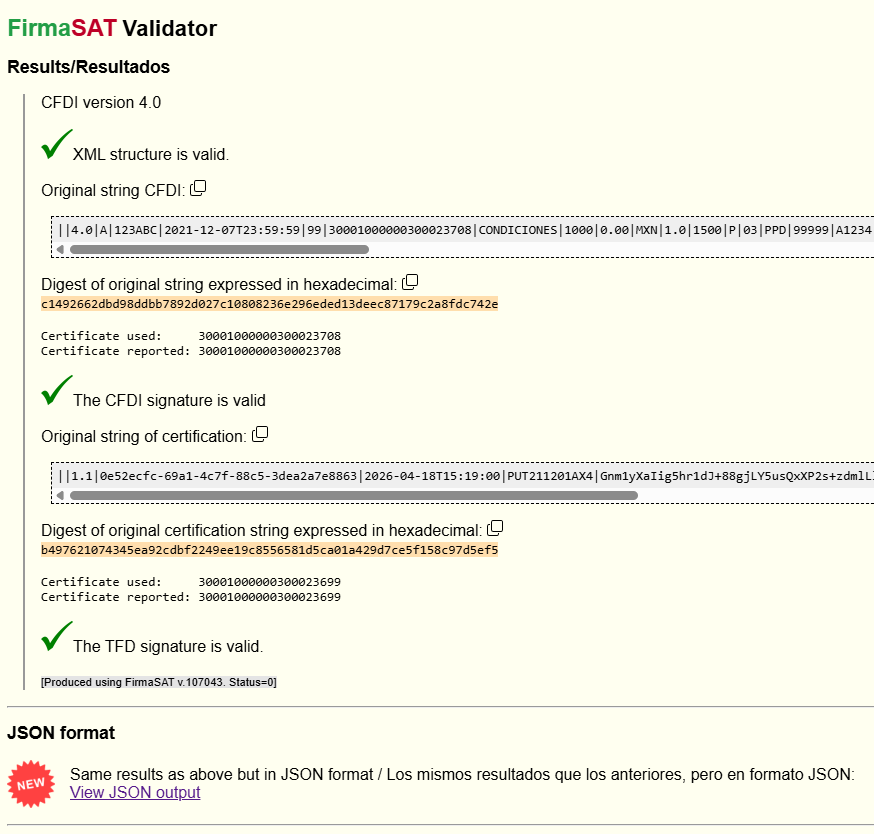
The FirmaSAT Validation REST API has only one endpoint and accepts just one method (POST). All communication is in JSON. The API does one thing: it validates a SAT CFDi[note] XML document. The response contains all the information provided at the On-line Validator but in JSON form. There is YAML documentation in OpenAPI format below.
The API validates 3 things:
[note] As well as CFDi, it can also validate Retenciones and Contabilidad and Controles Volumetricos documents. See Supported Document Types.
https://di-mgt.com.au/cryptosys/api/fsa_validation
Only the POST method is accepted. There are no URL parameters or query parameters.
The only header should be "Content-Type: application/json".
You need an API token to use this service. Get a free api-token here. For the moment, users are limited to 200 requests per calendar month and rate-limiting is enforced. We'll review this limit once we get an idea of demand. If you intend to do bulk requests, please contact us and we'll work something out.
2026-06-26: We've fixed up a problem with sending emails with your API Token. Some email servers including hotmail and gmail would reject our email. That should be fixed now. Thanks to Javier G for pointing out this issue and apologies for the inconvenience.
{
  "api-token": "<your API token>",
  "xmldata": "<input XML data>",
  "pac-cert": "<optional certificate data for PAC>"
}
"-----BEGIN CERTIFICATE" PEM-style encapsulation.
There are API client code examples below in Python, JavaScript, GO and C#.
Encoding the XML into JSON is important: see Encoding XML into JSON below.
{
  "status": "success|partialsuccess|error",
  "validation-result": { "<results in JSON form>" },
  "timestamp": "2026-05-27T03:58:57+00:00",
  "reference": "181106cc9b"
}
validation-result object contains all the information provided at the FirmaSAT On-line Validator but in JSON form.
See the Example below.
"status":"success" means that all three validations succeeded:
"xml-valid": true,
"signature-valid": true,
"tfd-valid": true
"status":"error" means that nothing succeeded:
{"status":"error","message":"bad-json"}
"status":"partialsuccess" means that the input was valid but at least one of the three validations failed.
Check the *-valid fields and the corresponding error messages. For example
"tfd-valid": false,
"tfd-error": "no certificate was provided.",
"xml-valid": false,
"xml-error": "XML structure is NOT valid.",
Be aware you cannot send "raw" XML data in the JSON request. You must serialize (encode) the XML data into a JSON string first. This requires escaping certain characters with a backslash (\). For the rules see Escape JSON String.
response = requests.post(url, json=payload) # the 'json' parameter automatically serializes the payloadbody: JSON.stringify(payload), // Note use of Javascript JSON.stringify()
"xmldata": "<?xml version=\"1.0\" encoding=\"UTF-8\"?>\n ...etc"
JSON.stringify(), Python's json.dumps(),
PHP's json_encode(), golang's json.Marshal() or C#'s JsonSerializer.Serialize().
"pac-cert":"MIIFgzCCA2ugAwIB...SsvuIBSk="Here are some suggested REST validation client code examples for the FirmaSAT validation service in various languages. There is a "full" client example that passes your XML data, and some minimal code to check your interface is working.
xmlFile) and an optional PAC certificate (either as a filename or a base64 string).The quick tests send an XML string which is well-formed XML but not a valid SAT XML document. This should return a status of "partialsuccess" with an xml-error "XML file is not a supported document". If you get this result, your api-token is valid and your code is working.
Test files required for the above client code: validation_rest_testfiles.zip (4.9 kB).
You can use curl to send a request. It gets messy with the escaping required, especially on Windows. However, it is a quick way to make a test like the minimal examples above, just to check that your api-token is correct and that the site is working. Here are minimal examples for both Windows and Linux. Click on the links to show the details.
curl -X POST -H "Content-Type: application/json" -d "{\"api-token\": \"YOUR_API_TOKEN_HERE\", \"xmldata\":\"^<?xml version=\\\"1.0\\\"?^>^<Person^>^<Name^>John^</Name^>^</Person^>\"}" https://di-mgt.com.au/cryptosys/api/fsa_validation
curl -X POST -H "Content-Type: application/json" -d "{\"api-token\": \"YOUR_API_TOKEN_HERE\", \"xmldata\":\"<?xml version=\\\"1.0\\\"?><Person><Name>John</Name></Person>\"}" https://di-mgt.com.au/cryptosys/api/fsa_validation; echo
These minimal examples send an XML document that is well-formed but not a valid SAT document. The correct response should be a status of "partialsuccess" with an xml-error "XML file is not a supported document". If you get this, it worked as expected.
Escaping: On the command line any double-quote character (") needs to be escaped with a backslash (\) and then any double-quote characters inside the XML data need double-escaping, and Windows requires escaping the "<" and ">" characters with a "^". It is left as an exercise for the reader to manage this with a real CFDi document :-). But it's good as a quick test.
Here is OpenAPI YAML documentation.
This REST API is provided for information purposes only. No warranties. Use at your own risk. See the full Disclaimer here
To contact us or comment on this page, please send us a message.
This page first published 17 June 2026. Last updated 8 July 2026